
Too much work to launch one service
Research, offers, copy, creative, and platform setup still live in different tools — even when you are only advertising your own work.
For contractors
Contractors use SROS to create Meta and ChatGPT campaigns for one business, then track leads, appointments, and reported results. HighLevel stays the CRM.
A single-business workspace for the campaign and what happened after.
Launch channels
Meta Ads
Facebook and Instagram
Launch channels
ChatGPT Ads
Advertising in ChatGPT
Works with
HighLevel
CRM and appointment workflows
Home improvement & services
SROS is built for the same home-improvement and home-service space agencies already serve. You launch a campaign for a promoted service in a market — an HVAC tune-up, a plumbing estimate, a roof replacement — not a separate product for each trade. Contractor plans stay on one business.
Trades in this space
If you sell local home-service work, this is the space SROS is built for. Product captures use a sample home-service business. The workflow is the same for other trades.
The problem
You need the launch, the lead, and the appointment connected on the same business — without a client roster to manage.
Research, offers, copy, creative, and platform setup still live in different tools — even when you are only advertising your own work.
Once the form is submitted, it is hard to see whether the appointment booked, showed, or was won without reconstructing the story.
Spend sits in the ad platform. Appointments sit in HighLevel. Reported results sit somewhere else.
The contractor path
Contractor plans keep a single-business workspace: campaign creation, leads, appointments, and reporting — without a client roster.
Create the campaign
See bookings and outcomes
See spend and results

Campaign launch
Pick the service and market, then move through research, offer, copy, and creative inside one launch. When it is ready, SROS creates the campaign on Meta Ads or ChatGPT Ads.

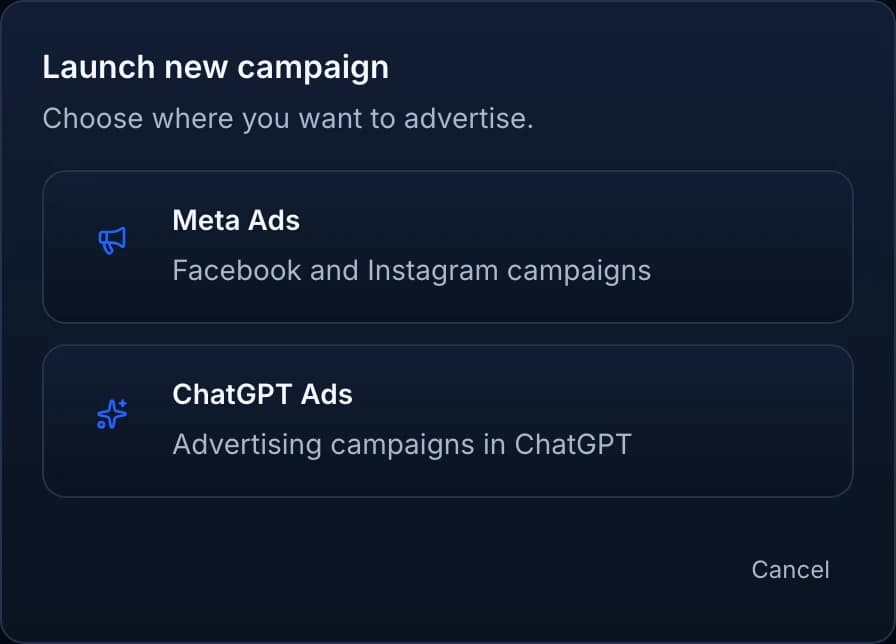
Create on Meta Ads or ChatGPT Ads from the same workflow. Campaigns may still require review by the advertising platform before serving. See how Meta campaign creation works.
Leads and appointments
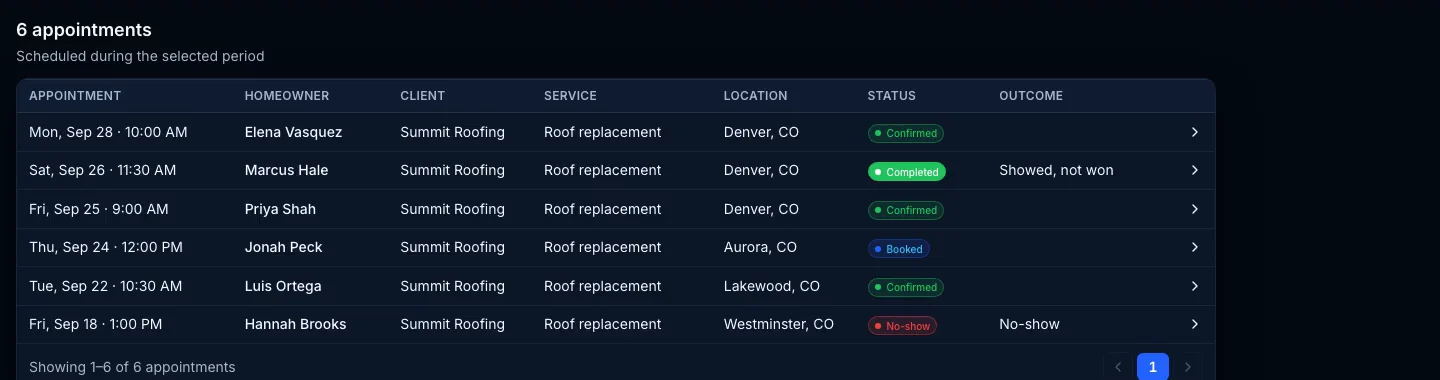
Meta lead-form submissions show in SROS. Track the appointment, record showed, no-show, other, or Client won, and add reported job value when the job is won.
SROS does not close the job or replace your CRM. HighLevel remains the system of record for contacts and booking.
Your stack
SROS launches campaigns and keeps the appointment outcomes and reporting on your business. HighLevel stays the CRM and calendar.
See how SROS works with HighLevelSROS keeps
HighLevel stays
Pricing
Every contractor plan includes campaign management, lead and appointment tracking, and reporting. Choose based on your team, included AI credits, and campaign capacity. Contractor plans are paid signup with no free trial.
For owner-operated contractors running their own marketing.
$197/mo
1 user
150 AI credits / month
For growing contractors with a sales, office, or marketing team.
$397/mo
Up to 5 users
500 AI credits / month
For larger contractor operations with more people and higher marketing volume.
$797/mo
Up to 15 users
1,500 AI credits / month
Plans start at $197/month. Compare limits on the contractor pricing tab. Sign up and manage billing inside the SROS app.
Choose a workspace
This page
You are the business. Launch campaigns for your own services on a single-business workspace.
You are in the right place.
Different workspace
You launch and report for other companies. Agency plans are built for a client roster, fulfillment, and reporting across accounts.
SROS for agenciesFAQ
Both. Contractor plans are a single-business workspace: create campaigns, see leads and appointments, and keep reported results visible. Agencies that manage a client roster use a different plan set.
Yes. SROS is the tool for agencies serving contractors in home improvement and home services — HVAC, plumbing, roofing, and other local trades. You launch a campaign for a promoted service in a market. Contractors can run a single-business workspace in the same space. HighLevel stays the CRM.
Contractor plans are a single-business workspace. Agency plans are for a client roster — launches, fulfillment, and reporting across the companies you manage.
No. HighLevel remains the CRM and calendar. SROS works with it for appointment intake and keeps the launch, outcome, and reporting on your business.
Yes, after setup and readiness. SROS creates the campaign on the channel you choose. The advertising platform may still review the ads before they serve.
Meta lead-form leads show in SROS. You can track the appointment, record showed, no-show, other, or Client won, and add reported job value when the job is won.
No. Contractor plans are paid signup. Sign up and manage billing inside the SROS app.
Get started
Contractor plans stay on a single-business workspace. Paid signup with no free trial. Sign up and manage billing inside the SROS app.
Managing other companies? See SROS for agencies.